Page updated Nov 17, 2025 – Hanadi
Registration FAQs (Breadth Electives)
Please be reminded that breadth electives are available on a first-come/first-served basis; if your first choice is not available, you should register in another available Elective instead. Breadth electives are not offered by the Faculty of Business and therefore, I am unable to submit a request to enroll you.
1. Fourth year (graduating) students missing a breadth elective
Contact <liberalstudies@humber.ca> or visit the Liberal Studies department at the Faculty of Liberal Arts at the Lakeshore Campus in the MED Building, Floor 3, Room 306, Office D (Address: 3170 Lakeshore Blvd. West) for support enrolling in a course to fulfill your graduation requirements (i.e. ONLY if you are missing a breadth elective needed to graduate)
2. Restrictions on Upper Level Breadth Electives
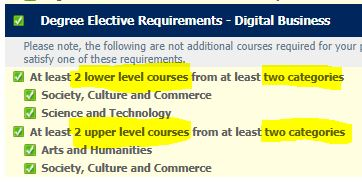
When registration opens, upper-level breadth electives will be restricted to semesters 5-8 students. Restrictions will be lifted two weeks after registration opens, and students in semesters 1-4 will be able to self-enroll in upper-level breadth electives. Please pay attention to the campus “LA: Lakeshore”, and “NO: North” campus when enrolling in breadth electives.
3. Program Restrictions or “Full” Breadth Electives
The note below is from the Faculty of Liberal Arts regarding breadth electives:
- You may register in any Elective that 1) has seats available and 2) does not have a restriction that applies to you. (Note: Restrictions are not errors.)
- Some Electives fill up very quickly when Registration opens. Please note that we do not over-enroll classes, nor do we over-ride restrictions. If the Elective you want is full or if it has a restriction, you must choose a different Elective.
- It is recommended that you enroll in an available Elective as soon as possible, even if it’s not your first choice of topic, day/time, and/or delivery method. You can then continue to monitor My Humber to see if a seat opens up in your preferred Elective before the last day to add courses.
4. To see a list of all Degree Breadth Electives on MyHumber
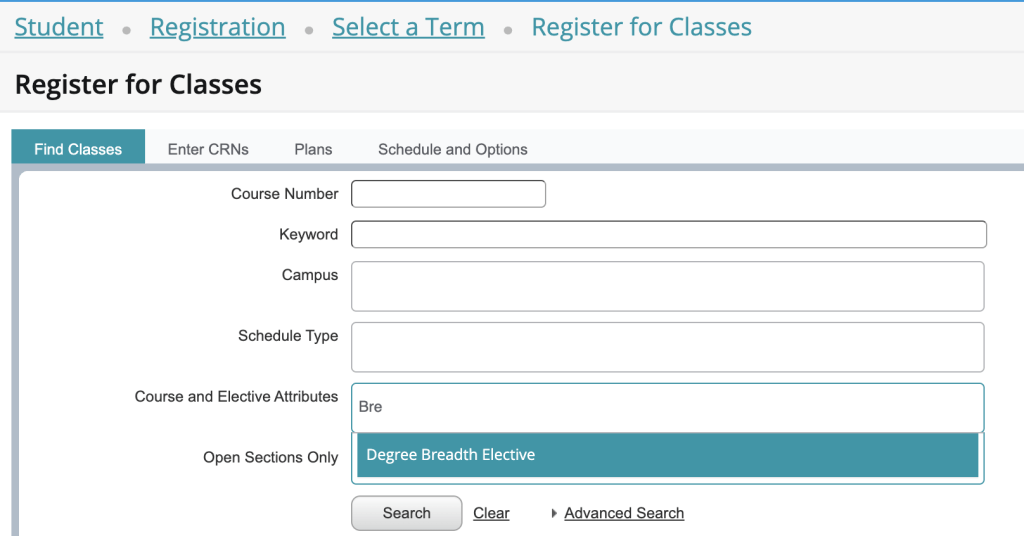
In the Student tab on MyHumber, click on Registration -> Click Register for Classes -> Select term -> Insert “Degree Breadth Elective” in the Attribute box -> Check the “Open Sections Only” box -> Click Search. A list of all the Breadth Electives will pop up. You will still need to check for restrictions, as this list includes some that are not offered as Breadth this term. Be sure to scroll all the way down the list, as those near the bottom tend to have more seats available than those near the top.
You can also check the list of electives, you can search by level and category
5. Modes of Delivery for Degree Breadth Electives
a. In person
The class meets in person at the scheduled time(s) and day(s). Students should also set aside time each week to check Blackboard and work through course materials and assignments. When registering, check the day(s) and time(s) that the class meets each week. Also check the campus location.
b. Online asynchronous
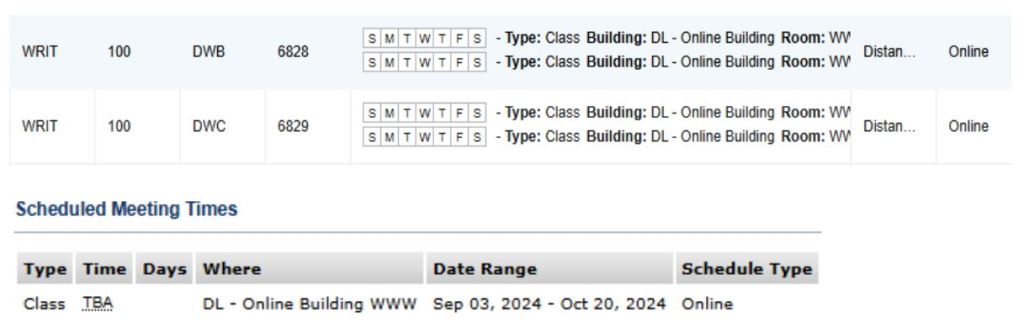
The course is delivered online. There is no class day or time because there are no scheduled classes. Some courses may require students to complete tests in person. Students need to set aside time each week for self-study via Blackboard to work through course materials and assignments. When registering, the class search option will show no meeting times (or “TBA”) and the location as “Online WWW.” Refer to the example in the screenshot below.
c. Online synchronous
The course is delivered online. Some courses may require students to complete tests in person. The class meets online at the scheduled time(s) and day(s). Students need to set aside time each week for self-study via Blackboard to work through additional course materials and assignments. When registering, check the day(s) and time(s) that the class meets each week. The location will be online.
d. Hybrid: In-person + online asynchronous
The course is delivered partly in person and partly online (asynchronously). The class meets in person at the scheduled time(s) and day(s). Students need to set aside time each week for self-study via Blackboard to work through additional course materials and assignments. When registering, check the day(s) and time(s) that the class meets each week. Also check the campus location.
 Hanadi Alnawab