Page updated Nov 10, 2025 – Hanadi
Registration FAQs
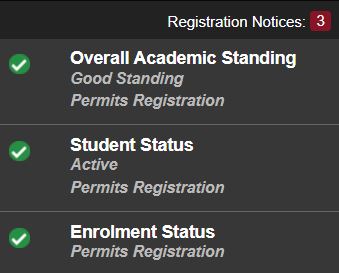
Please check your Registration Status on MyHumber before sending me an email:
- On the top right corner of the Advising Page, there will be information available in the Registration Notices that inform the student of their eligibility to register.
- Green checkmarks beside each status means you’re good to go!
- If the student is missing one or more of the three checkmarks, they will experience issues with registration.
If you need to send an email, you MUST include your student number as part of a descriptive subject line, for example: “Registration Issue BUS 1000 CRN 1234 student N0123456”
- Send one email including all the information needed
- Include the course code, title, and CRN (4 digit number that is section-specific)
- Include a screenshot of the error message you’re getting when trying to self-enroll
- Please note that SAFs submitted (Student Action Form) can take up to 72 business hours to be processed
Common Registration Issues
1. Enrolment Status Prevents Registration (following are the most common issues):
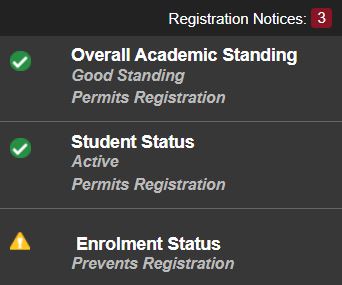
- Deposit Required: The student has to pay their deposit.
- Deposit Paid: The student has paid their deposit and needs to pay or arrange to pay the balance of their fees.
Please contact the Office of the Registrar to arrange for payment:
- Credit card payment should clear the hold within 90 minutes.
- Online banking payment will take 3-5 business days to receive the payment and the hold lifted once the payment is applied.
- The financial hub is available and provides payment options and other details for students:
- There is payment plan option still and the process is: Log in to MyHumber > Student > Student Account & Fees > Payment Plans to set up a payment plan. Payment plans are managed by Flywire, and funds paid/collected are reflected on the MyHumber student account. For any questions about a payment plan, contact <paymentplan@humber.ca>
- If you have other questions, please contact the Office of the Registrar <enquiry@humber.ca>, or call them 416.675.3111 or toll-free at 1.877.675.5660, Monday to Friday 8:30 a.m. to 4:30 p.m.
2. Closed Section (my preferred sections are FULL: 0 space)
You will not be able to self-enroll in classes that are full, and unfortunately, I will not be able to enroll you if there are other sections with available space. You must self-enroll in a section that has space, and keep monitoring your preferred section(s) for changes as some students may drop and a spot becomes available. Enrollment will continue to fluctuate until the last day to add courses.
3. Restrictions (Program or Semester)
Most (not all) restrictions will be lifted two weeks after registration opens (Monday Dec 1, 2025 around noon)
Please note that restrictions are not errors: when registration opens, courses will be restricted to the semester & program in which they are supposed to be taken based on the program curriculum, accessible through your Academic Progress on MyHumber, this is to ensure that those students who need to take them do get a seat. You will be able to self-enroll in courses that are not in your specific semester & program only after restrictions are lifted. Please contact me AFTER restrictions are lifted if you continue to experience problems with enrollment. I will then submit a SAF “Student Action Form” to the Office of the Registrar asking for help with enrollment. SAFs will only be processed by the Office of the Registrar after restrictions are lifted.
4. Business Degree Electives
Business Degree Electives are offered in Fall and Winter only (not Summer), and are typically restricted for the first two weeks for the reasons explained in point 3 above. To see a list of all Business Degree Electives on MyHumber:
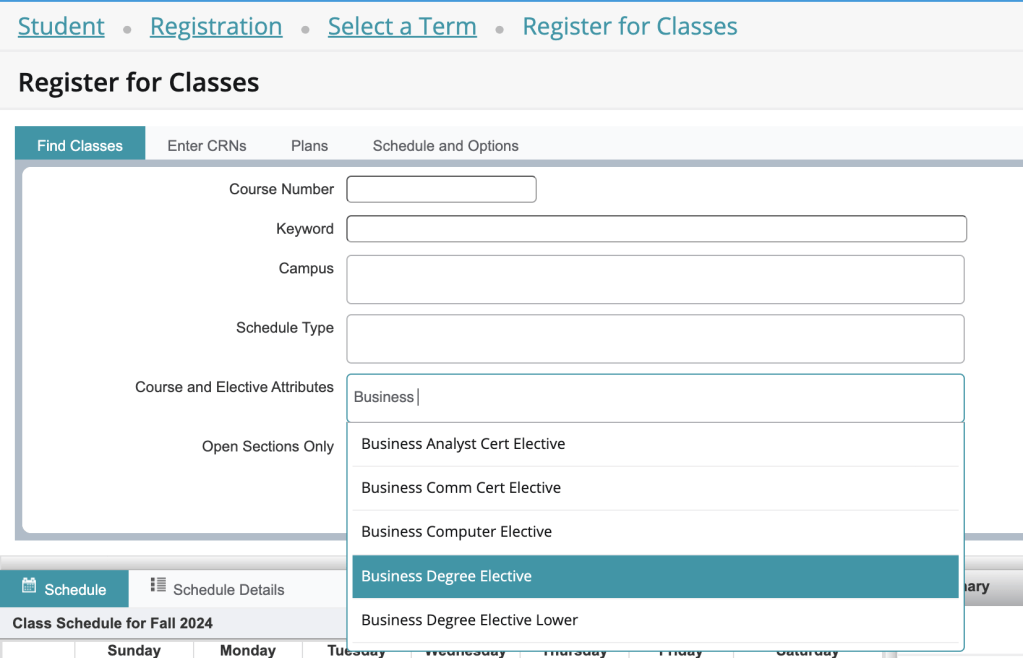
In the Student tab on MyHumber, click on Registration -> Click Register for Classes -> Select term -> Insert “Business Degree Elective” in the Attribute box -> Check the “Open Sections Only” box -> Click Search. A list of all the Business Degree Elective will pop up. You will still need to check for restrictions, as this list includes some that are not offered as electives this term. Be sure to scroll all the way down the list, as those near the bottom tend to have more seats available than those near the top
5. International Students: Hold due to Study Permit/Immigration reasons
- Students should follow the instructions to upload their study permit
- For questions, please contact international: https://international.humber.ca/
6. Second & third year students enrolling in BUS 2504 (Winter)
- If you are in semester 4: you should be able to self-enroll in the above
- If you are in semester 6 AND a transfer student (Diploma pathways), you will need to take the above course in your sixth semester, and can self-enroll when restrictions are lifted. If you have problems self-enrolling, please email me to be manually added
7. Third year students enrolling in WIL Tutorial
- Students registering into semester 6 Winter: please self-enroll in your Work-Integrated-Learning module: TUTR B99 (use section RLJ CRN 7214 for our program). Enrolling in this tutorial will give you access to resources to help you seek and secure an opportunity for your Summer work term (DIGI 3099).
- DIGI 3099 is the Paid Work Term course for Summer, and registration for it opens in the Winter (check the Academic Calendar for the date), and the CRN will be shared by your Placement Advisor in the TUTR Blackboard site once registration opens.
8. Fourth year students enrolling in semester 8
- Contact me if you are having issues enrolling in one of your semester 8 courses needed to graduate, and you have already completed the pre-reqs.
9. Breadth Electives
- Visit the following page for more details.
10. Can I fast-track and complete the program in less than 4 years?
The program is designed to be taken full-time (4 years, 8 semesters), please be reminded of the following as you plan and select courses:
- Check the curriculum (with pre-reqs) as you prep for the registration
- Semester 1, 3, 5, 7 core courses are offered in the Fall
- Semester 2, 4, 6, 8 core courses are offered in the Winter (semester 2 core courses are also offered in the Summer for the January intake)
- Business Degree electives are offered in Fall and Winter only (not Summer)
- Degree Breadth electives are offered in Fall, Winter, and Summer (with an online option)
Taking breadth electives in the Summer or a heavier course load in earlier semesters may lead to a lighter course load in later semesters. However, it will not shorten the overall length of the program, as prerequisite requirements must still be met in sequence.
11. Can I take upper-year courses while I’m in an early semester?
Students in the early semesters of the program must only register for the courses assigned to their semester. Enrolling in courses from later semesters will put you out of sequence and may create serious issues when registering for future classes, for the following two reasons:
- Missing prerequisites: Without the required prerequisites, you will be blocked from enrolling in certain courses, preventing you from progressing on time.
- Timetable conflicts: Core course schedules are built semester by semester to avoid overlaps. Taking courses out of sequence can create conflicts that block enrollment in required courses. For example, Semester 5 and Semester 7 core courses may be scheduled at the same time, since they are intended for different cohorts.
Please note that while the registration system does not prevent you from enrolling in upper-year courses, doing so will lead to the challenges explained above and may delay your graduation, putting you at risk of not completing the program within the 4-year limit.
Please review the program curriculum (including prerequisites) carefully before registering.
Registration Resources & Contacts
- Registration times: use the following link to determine your registration period
- Academic Calendar / Last Day to Add a Course: Please be reminded that students can add and drop courses until “The Last Day To Add a Course”, so enrollment in courses will keep changing until then. The following is a link to Humber’s Academic Calendar that includes important dates
- For questions about fees, contact <bursar@humber.ca>
- For questions about OSAP & Financial Aid, contact <finaid@humber.ca>
- Summer Registration FAQs
 Hanadi Alnawab