Page updated March 2024 – Hanadi
Registration FAQs (Summer)
You can view available courses now on MyHumber for Summer 2024. Please note that only the following courses are offered in the Summer:
- Degree Breath Electives: visit the following page for more details
- Please be reminded that taking Summer breadth electives may result in lighter course load(s) in the future, it will NOT result in earlier graduation from the program (i.e. students cannot complete the program in 3 years instead of 4 due to pre-reqs)
- Semester Two Core Courses: for students who are currently in semester one (January intake), or students in upper semesters who need to reach back to a semester two course (restrictions will be lifted two weeks after registration opens – see note below)
- Restrictions are not errors; when registration opens, courses will be restricted to the semester & program in which they are supposed to be taken based on the program curriculum, accessible through your Academic Progress on MyHumber, this is to ensure that those students who need to take them do get a seat. You will be able to self-enroll in courses that are not in your specific semester & program only after restrictions are lifted. Please contact me AFTER restrictions are lifted if you continue to experience problems with enrollment. I will then submit a SAF “Student Action Form” to the Office of the Registrar asking for help with enrollment. SAFs will only be processed by the Office of the Registrar after restrictions are lifted
If you are NOT semester 2 student and would like to take breadth electives or reach back to semester 2 courses, you will need to do the following in order to pay your fees:
- Find the Pre-Registration E-Form: Visit MyHumber -> Student -> Student Records -> Records/Registration E-form
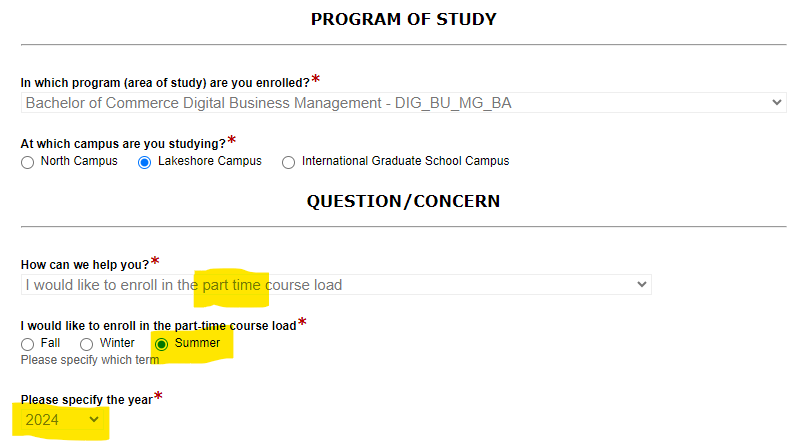
- Complete the E-Form as shown in the screenshot below, indicating that you would like to be enrolled “part-time”
- After you complete Step 2, you will receive an email from Humber advising you to pay your fees
- Pay your fees in full before the due date
- Register yourself in the courses you would like to take as soon as you are allowed
Additional Information for OSAP Students & International Students:
- Full-time OSAP students should visit humber.ca/osap to review OSAP eligibility and course load requirements in order to be fully informed about how changes to enrolment may affect funding.
- International students should consult with the International Centre, as changes to enrolment may affect their status in Canada.
- Further information about Fees and Financial Aid can be found here: https://humber.ca/admissions/student-fees-financial-resources/tuition-expenses/payment-and-funding-options.html
Third year students enrolling in their Summer Paid Work Term (DIGI 3099)
DIGI 3099 is the Paid Work Term course for Summer, and you must self-enroll just like you would for any other course. Your account should now have the correct attribute (6C) for you to be able to register. Andrew will also be sending a notice on the TUTR site once registration begins.
There are no extra tuition fees for DIGI 3099, please ensure that you register before the last day to add a course. If you are doing both DIGI 3099 and a breadth elective, you must pay a tuition deposit and fees for the breadth elective course
 Hanadi Alnawab